How to play
New to play-by-post or to Talewrite? Start here. (New to the game itself? Learn 5e teaches the rules and how to make your first character.) It takes about ten minutes to read, and the free practice game takes about ten more.
- What play-by-post is
- 5e in two minutes
- Getting into a game
- Your character
- The table screen
- Writing a good post
- Rolling dice
- Combat
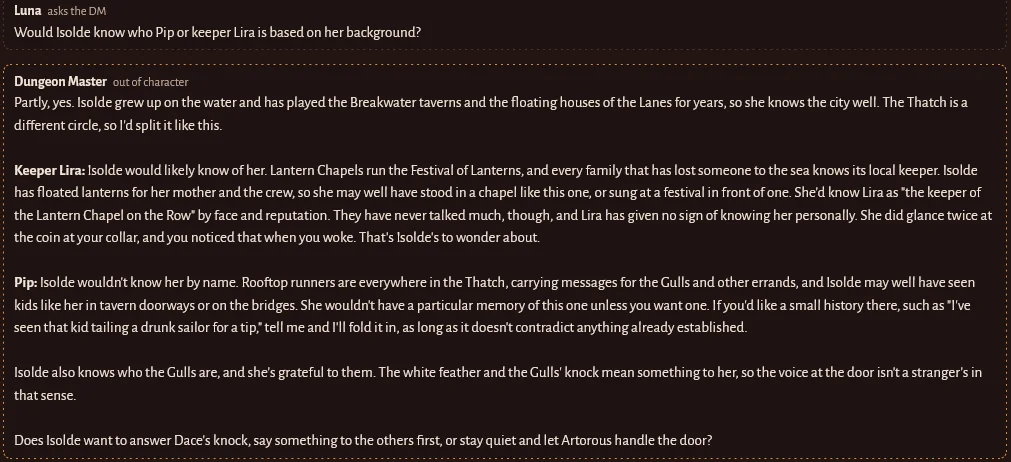
- Talking out of character
- Good habits
- AI DMs and human DMs
- Running a game yourself
- Emails, art, safety and more
What play-by-post is
In a normal tabletop session, everyone sits together for a few hours. Play-by-post is the same game played in writing, over days or weeks. The Dungeon Master (DM) writes a post describing what happens. Each player answers when they have a moment, writing what their character does. Then the DM writes the next part of the story.
Nobody has to be online at the same time. You can post from your phone on the bus at 8am and from your laptop at midnight. A game moves at the pace of its players: some tables post several times a day, others once every day or two.
5e in two minutes
- You play one character: a fighter, a wizard, a rogue and so on. You decide what they say and do.
- The DM runs everything else: the world, the people in it, the monsters, and what happens when you try something.
- When the result is uncertain, you roll a 20-sided die (a d20) and add a bonus from your character sheet. The DM sets a target number called the DC (difficulty class). Meet or beat it and you succeed.
- Your character sheet holds your bonuses, hit points, attacks, spells and gear. On Talewrite it does the maths for you: click a number on the sheet to roll it.
- There's no winning or losing. Failing a roll is part of the fun. It usually makes the story more interesting.
You don't need to learn the rules before you start. The site handles the numbers, and you can ask the DM anything at any time. Want the full picture? Learn 5e covers the rules, combat, spells and building your first character step by step.
Getting into a game
Join someone else's game
- Lobby: open Lobby on your dashboard to chat and to browse listings from groups looking for players. Listings show how often the group plans to post and the content rating. Use the filters above the listings to narrow them down: AI or human DM, free or paid seats, 2014 or 2024 rules, homebrew or official rules only, or only games marked 🌱 New players welcome. New to 5e yourself? Tick I'm new to 5e when you post your own listing, so tables that like teaching can find you.
- Invite link: if a friend runs a table, they can send you a link. Open it while signed in and you're in.
Start your own
- With lifetime access or a subscription, press + New table on your dashboard. Choose an AI DM (the AI runs the story) or run it yourself as a human DM. Then invite your friends with a link.
- House rules: the table's host can tick common house rules on the Campaign screen (for example, getting back up from 0 hit points costs a level of exhaustion). The AI DM follows them, and the site applies the ones it can, like the dice math.
- Want to practice first? Every account, free ones included, gets a private DM sandbox: a table only you can see, with all the human DM tools and no AI. Make test characters, try every tool, break things. When you're ready, turn it into a real game (that needs lifetime access or a subscription).
Invite friends
Under Account → Invite friends you'll find your invite link. A friend who signs up with it gets bonus free posts, and when they start playing, you get bonus posts or AI credit too (up to 20 friends).
Lifetime access and AI
Lifetime access ($9.99, once) is lifetime access to the site, not unlimited AI. Every AI DM reply costs money, so AI is paid for separately: lifetime access includes a one-time starter batch of AI for games you host, and after that you add AI credit packs or subscribe to keep your own AI campaigns going. Your lifetime access never runs out: you can always keep playing in other people's games (the host pays for their table's AI) and in human-DM games. Your Account page shows exactly how much AI you have left.
Gifts
Under Account → Gifts you can buy lifetime access for a friend. You get a link to send them, and it works once. If someone sent you a code instead (like TW-ABCD-EFGH), type it in at talewrite.app/gift or under Account → Gifts. You can also chip in AI credit for your DM there, to keep a campaign you're playing in going.
Free trial
Without buying anything, you can join games and make your first 25 posts for free. In-character posts, questions to the DM and whispers count toward that. Table talk and dice rolls don't. The practice game doesn't count at all.
A free account plays in one game at a time (the practice game and your DM sandbox don't count), so trial players don't fill seats all over the site. To switch games, leave the one you're in from its card on your Tables page. Lifetime access lifts the limit.
Drop-in games are free AI games anyone can join from the Tables page to try play-by-post with other people. Everyone can be in one drop-in game at a time, with up to 10 posts a day each, and the DM may rest late in the day when the game's daily AI budget runs out. Regular games don't have those limits.
Your character
Make characters under Characters on your dashboard. The builder walks you through race (or species), class, background and ability scores using the free 5e rules (the System Reference Document). You can bring the same character to any table.
- Already have a character on D&D Beyond? Press Import from D&D Beyond on the Characters page (or in a game) and paste its link. The character has to be set to Public there. Ability scores, levels, hit points, proficiencies, spells, gear and coins come across; anything that isn't in the free rules is listed in your notes so you can sort it out with your DM.
- Original subclasses: besides the official ones, every class has two Talewrite Originals subclasses to choose from.
- What I can do: on your sheet, this section lists every feature your character has at their level, from class, subclass, race, background and feats. Each has a one-line summary; tap it for the full rules. Filter by Action, Bonus action or Reaction to see your options on your turn, and see what your next level brings.
- Summons: familiars, animal companions, mounts and class summons live in the Summons tab, with their own stat blocks to roll from and tokens for the map.
Each character also has a public profile: a picture, a short description, personality and appearance. Other players see it when they click your character, so it's worth a few minutes.
The table screen
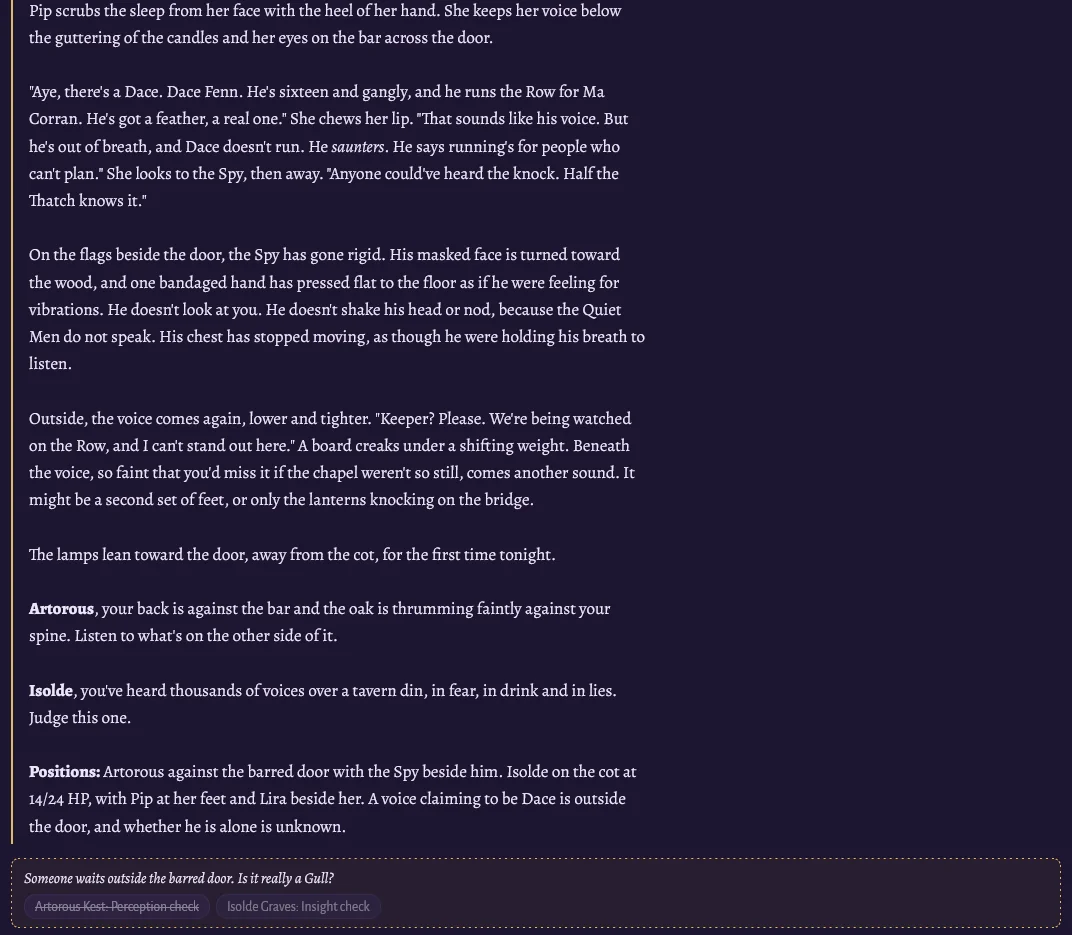
- The story (middle): every DM post, player post and roll, in order.
- The post box (bottom): where you write. The buttons above it choose who you're talking to.
- Your character (left): tabs for your sheet, spells, party, summons, handouts, maps, card decks, the campaign journal and your private notes.
- The map (right): when there's a fight or a place to explore, the DM puts a map here with tokens for everyone.
Writing a good post
A post is what your character says, does, thinks and notices. A few sentences to a couple of paragraphs is plenty. First person or third person both work. Pick whichever you like.
That example works because it gives the DM something to react to (calling out, moving carefully), shows a bit of personality, and leaves the outcome open.
- Describe what your character tries to do.
- Talk to other characters and react to what they did.
- Give a hint of feelings and personality.
- Leave space for the other players.
- Deciding the outcome ("I kill the goblin"). Try it, and let the dice and DM decide.
- Making other players' characters act or speak.
- Walls of text that cover a whole day of events.
- Using knowledge your character couldn't have.
Rolling dice
- When the DM asks for a roll, a button appears in the story and above the post box (for example "Rowan: Perception check"). Click it. The site adds the right bonus and shows the result to everyone.
- Rolling on your own: click any bonus on your sheet (an ability, a skill, an attack). Or type
/roll 1d20+3 Sneaking past the guardin the post box. - Advantage and disadvantage: sometimes you roll two d20s and keep the higher (advantage) or lower (disadvantage). Usually the DM or the site sets this for you. You can also toggle Adv or Dis next to the post box.
- Other dice: the DM can ask anyone to roll any dice, from a d4 to a d100 (a loot table, a random direction). You get a button for it like any other roll.
- Wild magic: a Wild Magic sorcerer is asked for a surge roll after casting a sorcerer spell with a slot, and if magic surges, the result is rolled and shown to everyone.
- Natural 20 and natural 1: rolling a 20 on the die itself is a natural 20. On an attack it's a critical hit. A natural 1 always misses an attack.
Combat
When a fight starts, the DM puts up a map and everyone rolls initiative to set the turn order. The order shows at the top of the table.
- On your turn, describe what you do and roll for it. Usually that's moving and taking one action, such as an attack, a spell, or helping someone.
- To attack, click the bonus next to your weapon under Attacks on your sheet. If the total meets the enemy's Armor Class (AC), you hit. Then click Dmg to roll damage.
- Keep an eye on your hit points (HP) at the top of your sheet. At 0 you fall unconscious and start making death saving throws, so tell the party if you're in trouble!
- Resting restores you. A short rest lets you spend hit dice to heal. A long rest (a night's sleep) restores most things.
Talking out of character
The buttons above the post box decide who you're talking to:
Good habits for long games
- Post regularly. Most games ask for a post at least every day or two. The table's listing usually says.
- Say if you'll be away. A quick table-talk note ("away this weekend, carry on without me") keeps everyone moving.
- Don't wait to be perfect. A short post today beats a long one next week.
- Read before you write. Skim what everyone posted since your last turn, so you can react to it.
- Share the spotlight. Give quieter characters chances to shine.
- Keep it readable. Use paragraphs, and put rules talk in Ask the DM or Table talk.
AI DMs and human DMs
- AI DM tables are run by an AI game master that writes the story, plays every character, sets DCs, runs fights and keeps notes. The AI is paid for by the table's host, not the players. The host decides whether it answers every post or waits for everyone.
- Human DM tables are run by a person, who posts as the Dungeon Master with the same tools. Some human DMs run free games, and some charge for a seat. You see the price before you pay.
- After a few days at a human DM's table, you can rate your DM and leave a testimonial to help other players find good games.
Running a game yourself
Human DMs get a 📖 DM tab that only they can see, and a 🎲 DM tools button for anything that changes the game. New to it? Press DM tour and it walks you through everything with highlights.
- Your DM book: organize the campaign into chapters and scenes with read-aloud text and private notes, build encounters and drop the monsters on the map, keep random tables to roll on, and track clocks, the calendar, quests and loot.
- DM tools: ask for rolls with a hidden DC, run monster attacks, hand out items, gold and XP, start combat, and share maps and handouts. Pick players, monsters, items and spells from drop-down lists instead of typing.
- Maps and handouts: upload your own picture, or describe one and have it drawn. How much you can upload depends on your plan (see Account → Upload space).
- Card decks: in the Cards tab, add a ready-made deck (playing cards, tarot, or the Deck of Many Things) or make your own. Players draw their own cards.
- Paid seats: connect your Stripe account under Account → Get paid to DM, then set a seat price on your table. Players pay through the site before they're seated, and you keep 90% (minus Stripe's card fee). All payment for games here has to go through paid seats: asking players to pay another way (Venmo, PayPal, Cash App, Patreon, tips) isn't allowed.
Emails, art, safety and more
- Emails: by default you get one email when there's something new at your table, and then nothing more until you visit. You can switch to a daily summary or turn them off under Account → Emails. Some DMs also set a turn reminder after a day or more.
- Who's here: the Lobby shows which members have the site open right now, so you can see who's around to chat.
- Art: the Gallery is where human artists show their work and take paid commissions, like a portrait of your character.
- Content ratings: every table is marked Everyone, Teen or Mature 18+, and can list content warnings. Pick games that fit what you're comfortable with.
- Safety: you can block people and report anything that breaks the rules. Reports go to our moderators, and serious ones are handled first. Talewrite is for adults (18+).