Text alerts
Talewrite can text you when it's your turn in one of your games. It's optional, and it's off until you turn it on.
How to sign up
- Sign in and open Account → Text messages.
- Enter your US or Canada mobile number.
- Tick the consent box. It's never ticked for you.
- Press Text me a code, then enter the 6-digit code we text you. Texts start only after that.
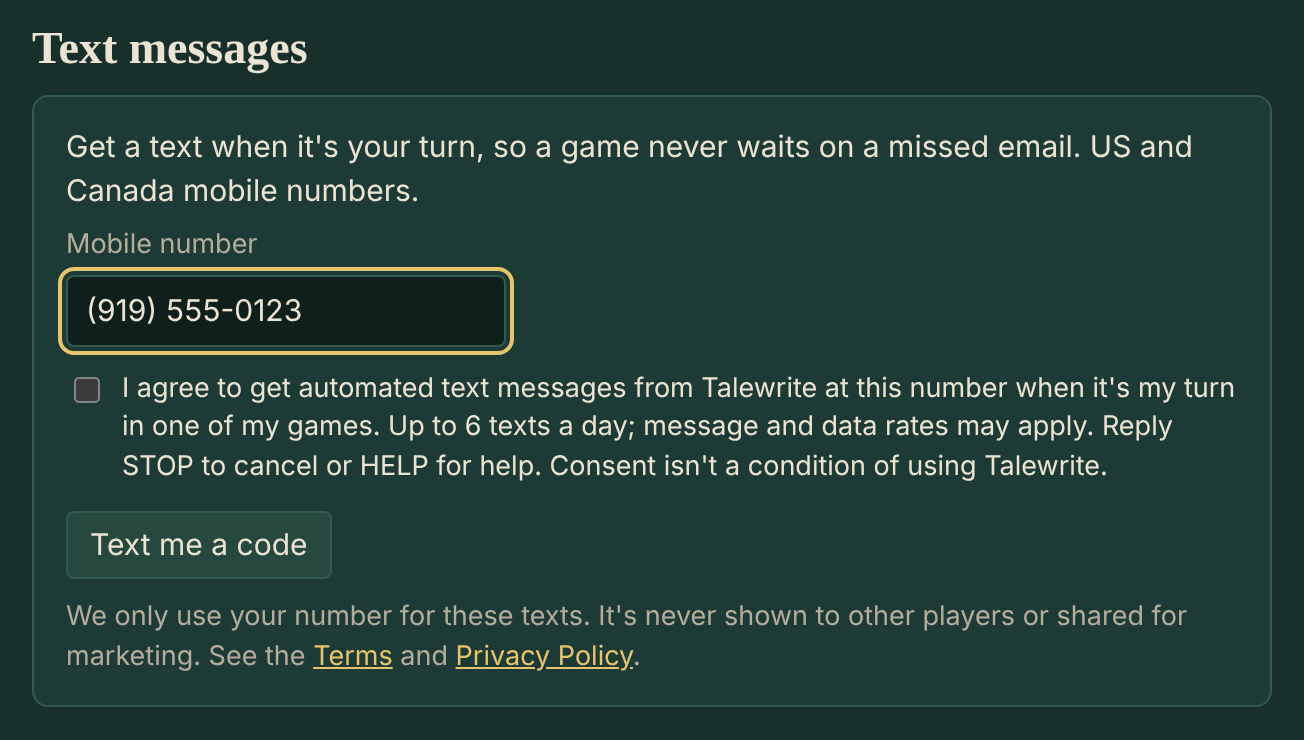
The consent box reads: "I agree to get automated text messages from Talewrite at this number when it's my turn in one of my games. Up to 6 texts a day; message and data rates may apply. Reply STOP to cancel or HELP for help. Consent isn't a condition of using Talewrite."
What we send
- Only game alerts: one text when it's your turn in a game, then nothing more for that game until you open it again. No marketing or promotions.
- How often: it depends on your games, at most 6 texts a day, and none between 10pm and 8am your time.
- Example:
Talewrite: The Drowned Chapel: it's your move. https://talewrite.app/t/abc123/ Reply STOP to stop texts. - Cost: free from us. Message and data rates may apply from your mobile carrier.
Stopping and help
- Reply STOP to any text to stop them, or turn them off under Account → Text messages. Reply START to turn them back on.
- Reply HELP for help, or email support@talewrite.app.
- Carriers aren't liable for delayed or undelivered messages.
Your number
We use your number only for these texts. It's never shown to other players, and we never sell it or share it, or any mobile information, with third parties for marketing. Text opt-in data and consent aren't shared with anyone except Twilio, which delivers the texts. See the Terms and Privacy Policy.